


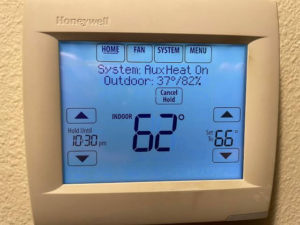
Honeywell thermostat displaying “System: Aux Heat On” with an indoor temperature of 62°F and a set temperature of 66°F.
You turn up the heat on a chilly Virginia Beach morning, but the house still feels cold. Then you spot AUX HEAT on the thermostat. Is something wrong, or is your system doing what it’s supposed to?
Some thermostat messages describe normal operation. Others point to a setting, a power issue, or an HVAC problem that needs a closer look. The exact wording varies by model, so take a photo of the display before changing any settings. Here’s how to make sense of six common situations.
1. “AUX HEAT” or “Aux Heat On”
If you have a heat pump, AUX HEAT means your system is calling for backup heat. It can come on automatically during colder weather or after you raise the temperature several degrees at once. (Source: Jackson EMC)
What to check: Compare the room temperature with the temperature you set. If the room is warming up and the message clears, your heat pump may be operating normally. If AUX HEAT comes on often in mild weather or the house still can’t reach the set temperature, schedule a service visit.
2. “Wait” or a flashing “Cool On”
On some thermostats, a Wait message or flashing Cool On means the system is briefly delaying startup to protect the compressor. Some Honeywell models use a delay of about five minutes. (Source: Honeywell installation guide)
What to check: Leave the thermostat settings alone while the delay runs. If the message stays on past the time listed in your manual and the system still hasn’t started, note how long it’s been displaying the message before calling for service.
3. A blank thermostat screen
A blank screen can happen when replaceable batteries run out or the thermostat loses power from the HVAC system. (Source: Honeywell installation guide)
What to check: If your thermostat uses replaceable batteries, install a fresh set using the type listed in the manual. If the screen stays blank or keeps going dark, have a technician check the power supply and equipment.
4. “Heat On,” but the house is still cold
Heat On usually means the thermostat is asking your system for heat. If the room temperature stays below your setting, the system may be struggling to deliver that heat. (Source: thermostat user guide)
What to check: Confirm the thermostat is in Heat mode, the set temperature is above the room temperature, and the fan is set to Auto. If the temperature still doesn’t rise, notice whether air is coming from the vents and whether the system keeps running or shuts off early. Share those details when you call.
5. “Hold” or a temperature that keeps changing
A programmable thermostat can change the set temperature according to its schedule. If you adjust it manually, a temporary hold may expire at the next scheduled change. On models with a permanent hold, that temperature stays in place until you cancel it. (Source: programmable thermostat guide)
What to check: Look for a message like Hold Until or Temporary Hold. If the temperature changes at the same time every day, review the schedule and see whether it matches when you’re home, asleep, or away.
6. An unfamiliar alert or error code
The same code can mean different things across makes and models. Your model’s manual is the best place to start.
What to check: Take a clear photo of the exact code and write down the thermostat brand and model if you know them. If the alert returns or your heating or cooling has stopped, share that information when you schedule service.
When to call for thermostat or HVAC service
If your home still won’t reach the temperature you set, the display keeps going blank, or the same alert keeps coming back, Reliance Home Comfort can check the thermostat and the equipment it controls.
When you call, have the message on the screen, the room temperature, and the temperature you set handy. Those three details give your technician a better starting point.
Need help in Virginia Beach or elsewhere in Hampton Roads? Call (757) 402-6749 or request a heating or cooling repair online.